Most people trying to break into IT project management have never seen a real enterprise project from the inside. They’ve read about them, watched videos about them, taken courses that describe them in the abstract — but they’ve never sat in the room when an executive sponsor demanded a status update at 4pm on a Friday, never been on the call when a vendor missed a critical milestone, never watched a project burn through its contingency budget in week four.
So when a hiring manager asks, “Tell me what an enterprise IT project actually looks like,” they freeze. This article fixes that. I’m going to walk you through a real enterprise IT project, end to end — not the textbook version, the real version.
Quick context: I’ve been an IT project manager for over eight years, working remotely from Mexico, Colombia, Peru, and Argentina — and in a single year I made over $300,000 doing this work. Most of it has been inside enterprise IT environments: software rollouts, infrastructure migrations, tool consolidations, security and compliance projects. The kind of work that involves six or seven stakeholder groups, multi-million-dollar budgets, and timelines measured in quarters.
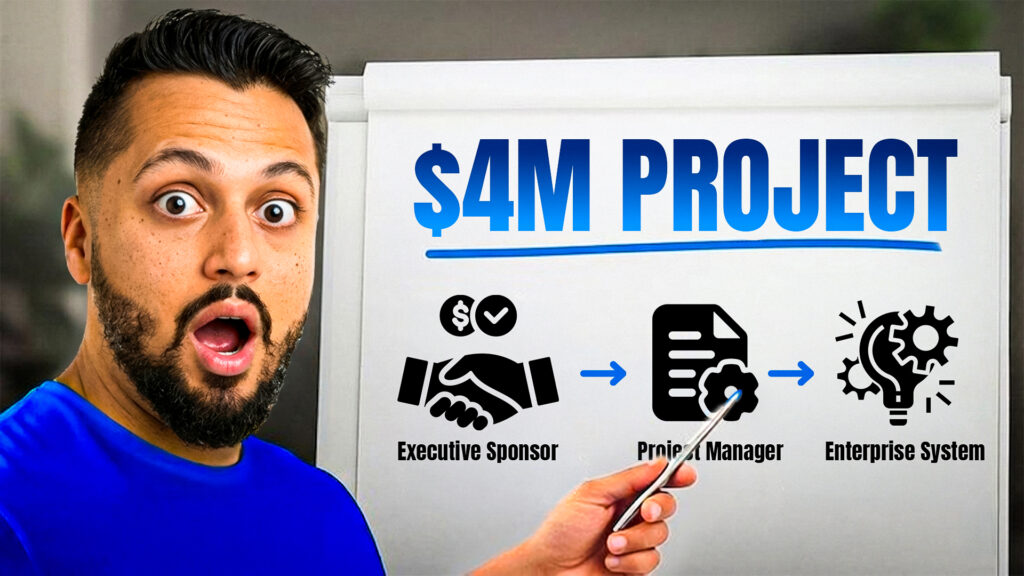
The project: a $4M CRM migration
For this walkthrough I’ll use a composite project pulled from a few enterprise environments — realistic, but not from any single client. It’s a customer relationship management (CRM) platform migration at a mid-sized enterprise of about 3,000 employees that has run a legacy CRM for a decade. Reporting is slow, integrations are painful, and sales leadership has complained for two years. Finance has finally approved the move.
- Budget: roughly $4 million across software licenses, implementation services, training, and internal cost
- Timeline: nine months from kickoff to full cutover
- Stakeholders: sales, marketing, finance, IT operations, security, customer success, and the executive sponsor
Phase 1 — Initiation
The project starts before it officially starts. Once you’re brought in, your first job is initiation: figuring out who’s involved, what the goal really is, and what you’re walking into. That means a kickoff with the executive sponsor (the senior leader who owns the budget), stakeholder interviews with each major group, and a project charter that captures scope, objectives, key risks, and success criteria — signed off before a dollar gets spent. Most career-changers underestimate how political this is. The technical work is straightforward; figuring out who’s aligned, who’s quietly opposed, and who’ll try to expand scope is the hard part. Initiation usually takes two to four weeks.
Phase 2 — Planning
Planning is where most enterprise projects either set themselves up for success or quietly doom themselves. You build a detailed schedule across every workstream (data migration, configuration, integration, security review, training, cutover), a RAID log of risks, assumptions, issues, and dependencies, a RACI matrix that determines how arguments get resolved, a stakeholder communication plan, and a line-by-line budget tracker. Career-changers think planning takes a week. In a real enterprise environment it takes six to eight weeks — and that’s not bloat. That’s the work it takes to align twenty people around a $4M initiative.
Phase 3 — Execution
Execution is the longest phase — six months here, years on bigger projects. Your job is to manage the work without doing it yourself. A typical week: leadership standup, vendor check-in, workstream one-on-ones, stakeholder steering committee, Friday status report. In between, you chase aging RAID items, update the schedule when something slips, mediate between stakeholders, escalate to the sponsor, approve change requests, and document decisions. Most weeks, something goes wrong — a missed milestone, a scope demand, a risk that finally materializes. Your job isn’t to prevent every one of those things. It’s to keep the project moving when they happen.
Phase 4 — Monitoring & Control
Monitoring runs in parallel with execution — not a separate phase in time, a separate function in attention. You compare actual progress and budget burn against baseline, track the RAID log for aging items, and watch for early warning signs: vendor estimates growing longer between calls, stakeholders sending delegates to steering committee, a sudden “exception meeting” request. Senior PMs catch those in week two and act. Junior PMs miss them until week eight, when the signal has become a crisis. The artifact you produce is the weekly status report — a one-to-two page document that is your historical record, your early-warning system, and the thing senior leaders read when they want to know whether you’re competent.
Phase 5 — Closeout
Closeout is the phase most projects do badly. When the new CRM goes live and the old system is decommissioned, there’s a temptation to declare victory and move on. Don’t. Real closeout means a hypercare period (two to four weeks of intensive support), a structured lessons-learned retrospective, an operational handoff to the team that will run the system, a finalized budget, and a closeout report for the sponsor. Companies that close projects properly compound lessons over years. The ones that don’t make the same mistakes on every project for a decade.
The people you’ll actually work with
The executive sponsor owns the budget and the political cover. The steering committee — senior leaders from each department — meets monthly to resolve cross-functional issues, and you run that meeting. The vendor project manager is your counterpart on the implementation partner’s side, and you’ll spend more time with them than almost anyone. Workstream leads run the individual pieces and report to you for the project but to their own managers for performance — a dual reporting dynamic that’s one of the trickiest parts of enterprise PM work. Business analysts, security and compliance reviewers, and internal IT operations round out the cast. Get security and IT ops involved early — they can kill a launch in week eight if you ignored them in week one.
The pitfalls that hit almost every project
- Scope creep — “small additions” that together push you six weeks late. Handle changes through a formal request process, not hallway conversations.
- Vendor underestimation — implementation partners under-scope during the sales cycle. Build contingency and push back on estimates during planning.
- Stakeholder fade — the sponsor is engaged at kickoff and missing by month four. Maintain that relationship deliberately with short, structured updates.
- Integration surprises — at least one connection turns out far harder than estimated. Surface integration risk early and build relationships with the teams that own the other systems.
- Cutover chaos — plan cutover like a separate mini-project, with its own runbook, contingency, and communication plan.
The takeaway
That’s an enterprise IT project, end to end: initiation, planning, execution, monitoring, closeout — plus the people and the pitfalls. If you walk into an interview with this mental model, even if you’ve never run a project this size, you’ll sound dramatically more credible than ninety percent of the candidates you’re competing against. Hiring managers can hear the difference between someone who’s read about projects and someone who can describe them.
The fastest way to actually sound experienced is to get real project experience — with real stakeholders, real ceremonies, and real artifacts you can put in your portfolio.
Related reading:
- The Real Reason Entry-Level PM Jobs “Require Experience”
- What Hiring Managers See When You “Know” PM But Have No Experience
- Project Coordinator vs Project Manager: What Nobody Tells You
- Project Management Experience Examples (What to Put on Your Resume)
Ready to close the Experience Gap? Join The Eddie System on Skool →
Ready to gain real IT PM experience?
Stop watching from the outside. Run real enterprise-style projects inside a live PMO.