Table of Contents
Introduction
What Makes a good Excel Template?
Best Excel Expense Trackers in the Market
The Benefits of Using Excel Expense Tracker
Conclusion
1. Introduction
In the age of digital finance tools and apps, many of us are looking for robust, customizable solutions to track and manage our finances. Amidst numerous software, Expense Trackers in Excel have proven to be an indispensable tool for countless people. Offering flexibility and customizability, Excel Expense Trackers enable users to have complete control over their financial data. This blog post will guide you through the Best Excel Expense Trackers in the market and introduce you to our own version, which promises simplicity and effectiveness.
2. What Makes a Good Excel Expense Tracker?
Before delving into the best options available, it’s essential to understand the features that set a good Excel Expense Tracker apart:
- User-Friendly Design: A clear layout and intuitive design ensure users can input data quickly and access insights without confusion.
- Customizability: Users should be able to tailor the tracker according to their unique needs, whether it’s creating custom categories or visualizing data differently.
- Data Security: Given the sensitive nature of financial data, the tracker should offer security features or at least guidelines on how to keep one’s data safe.
- Visualizations: Features like graphs, charts, and pivot tables allow users to understand their spending patterns better.

3. Top Excel Expense Trackers in the Market
In this section, we delve deeper into the specifics of the top Excel Expense Trackers available, examining their features, pricing, reputation of the author, as well as their pros and cons.
Table: Comparison of Top Excel Expense Trackers
| Feature/Tracker | BudgetBytes’ Detailed Tracker | Vertex42’s Money Manager | Tiller Money | Personal Finance’s Comprehensive Tracker | The Most Simple Expense Tracker EVER from Eddie Rizvi |
|---|---|---|---|---|---|
| Pricing | Free | $9.95 one-time | $6.58/month | Free with limited features; $19.99 Pro | $9.97 one-time |
| Author Reputation | 4.8/5 (from user reviews) | 4.7/5 (from user reviews) | 4.9/5 (from TrustPilot) | 4.6/5 (from user reviews) | 4.9/5 (from user reviews) |
| Customizability | High | Medium | High | Very High | UNLIMITED |
| Visual Analytics | Basic | Basic | Advanced | Comprehensive | Comprehensive |
1. BudgetBytes’ Detailed Tracker
Features:
- Detailed categorization for meticulous tracking.
- Allows for a clear snapshot of monthly and yearly expenses.
Pricing: Free
Author Reputation: BudgetBytes is known for its user-friendly financial tools, and their Detailed Tracker has received a 4.8 out of 5-star rating based on user reviews.
Pros:
- No cost involved.
- Detailed categorizations help in understanding the nuances of one’s spending.
Cons:
- Limited visual analytics.
- Requires manual data entry.
2. Vertex42’s Money Manager
Features:
- Streamlined design for easy tracking and budgeting.
- Includes both a dashboard and detailed sheet views.
Pricing: $9.95 (one-time purchase)
Author Reputation: Vertex42 is renowned for its range of Excel templates, and the Money Manager boasts a 4.7 out of 5-star rating from users.
Pros:
- One-time purchase without recurring costs.
- Advanced visual analytics for better financial insights.
Cons:
- Some users find it slightly complex due to its comprehensive features.
- Requires manual data entry.
3. Tiller Money
Features:
- Integrates with Excel for automatic bank transaction updates.
- Offers budgeting tools and financial dashboards.
Pricing: $6.58/month (billed annually)
Author Reputation: Tiller Money, though not a standalone Excel template, has won users over with its seamless integration, reflected in its 4.9 out of 5-star rating on TrustPilot.
Pros:
- Automated data integration reduces manual data entry.
- Advanced visualizations and dashboards.
Cons:
- Monthly subscription cost.
- Depends on third-party connections for data, which may occasionally lag.
4. Personal Finance’s Comprehensive Tracker
Features:
- Covers a broad spectrum, from daily expenses to investments.
- Offers high customizability.
Pricing: Free for the basic version; Pro version available at $19.99 with additional features.
Author Reputation: Personal Finance’s tools are well-regarded, with the Comprehensive Tracker getting a 4.6 out of 5-star rating from users.
Pros:
- Comprehensive financial view covering multiple aspects.
- Pro version offers extensive customization and added features.
Cons:
- The free version might seem limited to power users.
- Requires manual data entry and setup for investment tracking.
5. The Most Simple Expense Tracker From Eddie Rizvi
Features:
- Designed for simplicity and ease of use
- Offers excellent analytics to understand your spending habits and spend categories
Pricing: Premium Version ($9.97), Advanced version (for those who want to see under the hood and mess around with formulas) (29.97)
Pros:
- Comprehensive financial view covering multiple aspects.
Cons:
- Could be too simple for advanced users and developers
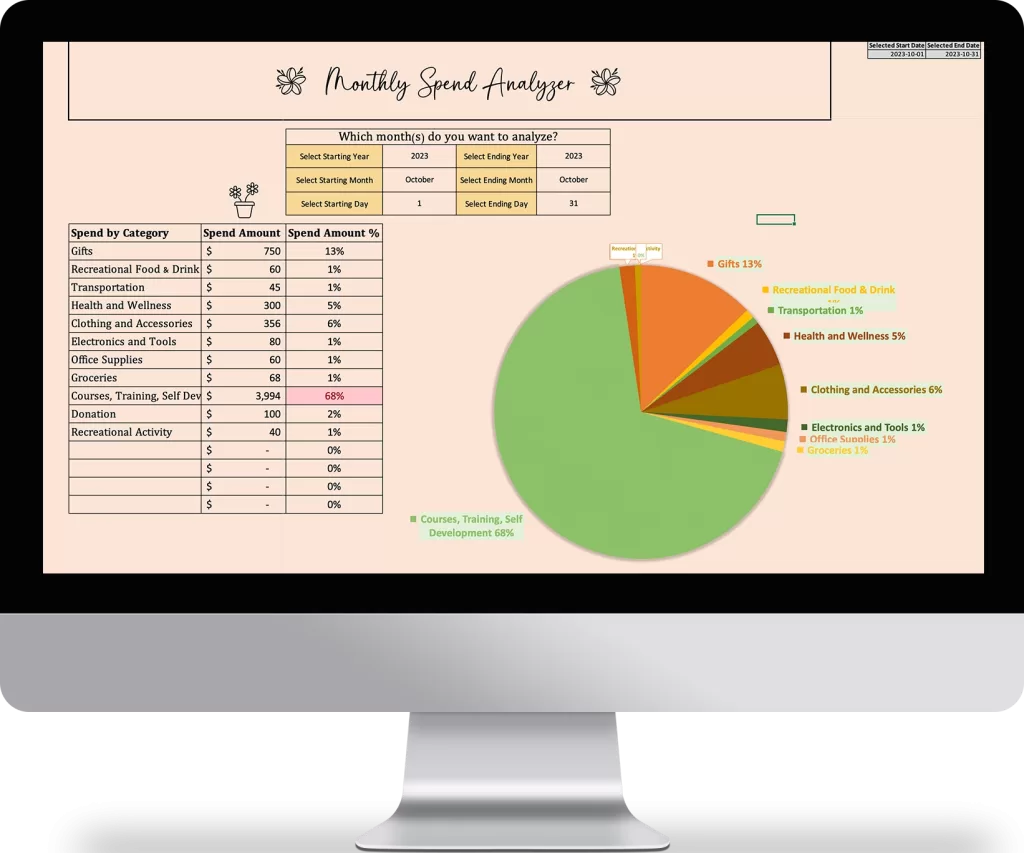
By understanding the specifics of each Excel Expense Tracker, users can make an informed choice that aligns best with their needs and financial goals.
4. The Benefits of Using Excel Expense Tracker
An Excel Expense Tracker brings multiple advantages:
- Flexibility: Unlike many dedicated apps, Excel templates are easily adjustable to fit individual requirements.
- Cost-Effective: Many trackers come free or at a one-time purchase, avoiding monthly subscription fees.
- Offline Use: Excel Expense Trackers work without needing an internet connection, ensuring data privacy and uninterrupted access.
- No Learning Curve: For those familiar with Excel, using a tracker won’t require learning a new software from scratch.
5. Conclusion
In the realm of personal finance, having a tool that aligns with your needs is crucial. Excel Expense Trackers, with their versatility, continue to be a favorite choice for many. As you explore the various options available, we hope our breakdown helps you make an informed decision. And don’t forget to try out “The Most Simple Expense Tracker EVER.“
Do you have experience with any of these trackers, or perhaps a different one that deserves mention? We invite you to share your insights and thoughts in the comments below.